




A busy workplace can make even familiar voices harder to follow. Air conditioning, keyboards, nearby conversations, and meeting-room acoustics all add competing sound throughout the day. Hearing aids for noisy environments can help you focus more easily on speech when their features and settings suit the situation. A few changes to where you sit, how coworkers communicate, and how your devices are adjusted can also make meetings and everyday office conversations feel more manageable.
Why Workplaces Can Become Difficult Listening Environments
Open offices and meeting rooms often combine several competing sounds at once, including HVAC systems, keyboards, phones, nearby conversations, and room reflections. These sounds can make speech harder to follow, especially when the speaker is farther away or several people are talking from different directions. Meetings can feel even more demanding because the main speaker changes frequently. This is why a workplace may become a challenging listening environment even when it does not seem especially loud.
Practical Ways to Make Workplace Conversations Easier
Technology works better when the listening environment is working with you. Before changing hearing aid settings, look at where the conversation is happening and how much unnecessary sound you can reduce through simple choices. During meetings, these habits can help:
- Move closer to important speakers. Shorter distance gives their voice a stronger advantage over surrounding office noise.
- Choose a seat with a clear view. Seeing facial expressions and mouth movements provides extra context when a word is difficult to catch.
- Stay away from obvious noise sources. Air vents, open doors, coffee machines, printers, and hallways can compete with nearby speech.
- Use written information as backup. An agenda can prepare you for names, topics, and unfamiliar terms. Written follow-ups are useful for deadlines, numbers, and action items.
- Confirm important details while the conversation is fresh. Asking someone to repeat a date or task is often easier than trying to reconstruct it later.
Similar adjustments work for quick conversations around the office. If a coworker starts discussing something important while standing several feet away, moving closer can help. A conversation beside a noisy break room may also become much easier after moving to a nearby desk or quieter corner.
Communication habits can make a difference too. Coworkers can face you when speaking, avoid talking from another room, and take turns during smaller group discussions. These changes are simple and usually improve communication for everyone at the table.

How Hearing Aids for Noisy Environments Support Office Listening
Modern noise reduction hearing aids use several types of sound processing to help manage complex environments. Their effect varies with the type of noise, where the speaker is located, and how the device is adjusted. Office sounds remain audible, while some competing sounds may become less prominent and speech can become easier to follow.
Noise Reduction Can Reduce Competing Sound
Steady sounds such as ventilation or ongoing room noise can compete with speech throughout the day. Noise reduction processing can lower the prominence of some of that competing sound, helping you place more attention on the conversation.
The experience is different from putting on noise-canceling headphones. In a workplace, awareness still matters. You may need to hear a coworker approaching, an announcement, a phone notification, or another environmental cue. Good office listening therefore depends on balancing conversation support with useful awareness of what is happening around you.
Directionality Can Put More Attention on the Speaker
Directional microphone processing becomes useful when the person you want to hear is in a predictable position. During a face-to-face conversation or across a meeting table, the hearing aids can place greater emphasis on sound arriving from that direction and less emphasis on competing sound from elsewhere.
Speaker position can change quickly during larger meetings, so directionality will not make every situation equally easy. Turning toward the current speaker and keeping them reasonably close can help the technology work with the conversation rather than against it.
Speech Processing Can Help Important Details Stand Out
Speech-focused processing works alongside noise management and directionality to make conversational information easier to access. This can be particularly useful when voices are competing with low-level office noise or when you are trying to follow a colleague across a meeting table.
This combination is one reason the benefits of hearing aids at work go beyond making voices louder. Useful hearing support can help you stay with the flow of a discussion, catch more of what coworkers say, and spend less effort trying to piece together missing words.
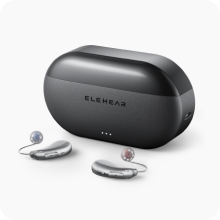
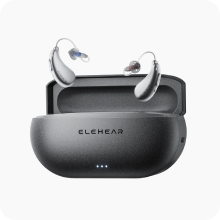
For example, ELEHEAR Beyond Pro uses VOCCLEAR® 2.0, which brings together speech enhancement, AI noise reduction, and directional processing. These functions are designed to work together when speech and surrounding sounds compete, making the technology relevant to meetings, shared offices, and other everyday listening situations.

How to Personalize Hearing Support for Different Work Situations
Your listening needs can change between an open office, a quiet one-on-one conversation, and a larger meeting room. Start by checking whether your current listening mode suits the situation, then make one adjustment at a time and listen for changes in speech clarity and comfort. For adults using self-fitting OTC devices, the FDA’s guidance on OTC hearing aids notes that some models allow greater customization through software and smartphone apps.
Different work situations may call for different adjustments:
- Open office: If nearby conversations or steady room noise feel distracting, try a noise-control setting that makes those sounds less prominent while keeping important workplace sounds audible.
- Face-to-face conversation: When the person you want to hear is in front of you, a more directional setting may help place greater emphasis on speech from that area.
- Meeting room: If speakers are coming from several directions, a broader listening setting may feel more natural than a strongly front-focused one.
- Quiet desk work: A lower level of noise control may be enough when there is little competing sound.
With compatible devices, the ELEHEAR App controls include volume, listening mode, noise control, and directionality. Changing one control at a time makes it easier to tell what actually helps. Instead of judging the whole workday as “good” or “bad,” note specific problems such as “voices at the far end of the table are still hard to follow” or “the conversation behind me keeps pulling my attention away from the person in front of me.”
Those real-world examples are also useful if self-adjustment does not fully solve the problem. ElePro Plus remote fine-tuning connects users with licensed hearing professionals who can adjust device settings based on hearing needs, listening situations, and real-time feedback. ELEHEAR specifically positions the service for everyday environments such as offices, so detailed workplace examples can help make a remote session more relevant to how you actually listen during the day.

Make Workplace Conversations Easier to Stay In
Office communication becomes easier when several small advantages work together. Move closer to important speakers, choose your position carefully, use written information when it helps, and adjust hearing aid features for the environment you are actually in. Pay attention to situations where speech still feels difficult. A clear description of what you hear, where the speaker is, and what noise surrounds you gives you a much better starting point for personalization and fine-tuning. The aim is a workday where following conversations takes less effort and staying involved feels more natural.
Common Questions About Hearing Aids in Noisy Offices
Q1. Do Noise Reduction Hearing Aids Remove Office Background Noise?
Noise reduction hearing aids can reduce the prominence of some competing sounds, especially steady background noise, while keeping the surrounding workplace audible. Results depend on the sound environment, speaker position, device technology, and settings. Combining these features with shorter speaking distance and better positioning often gives you more control in meetings and shared offices.
Q2. Why Can I Hear Coworkers One-on-One but Struggle During Meetings?
One-on-one conversations usually give you a clearer speaker position, shorter distance, and more visual information. Meetings introduce changing speakers, room reflections, greater distances, and competing voices. Those factors can make individual words harder to catch even when the overall conversation sounds loud enough.
Q3. Should I Increase My Hearing Aid Volume in a Noisy Office?
Try other adjustments before relying on more overall volume. Higher volume can increase both the conversation and surrounding office sounds. Moving closer to the speaker, changing your position, or adjusting noise control and directionality may give speech a better advantage without making the whole room sound louder.
Q4. Where Should I Sit During a Work Meeting?
Choose a position where you can see the main speakers clearly and stay reasonably close to them. When possible, keep strong noise sources such as air vents, open doorways, and office equipment away from your immediate seating area. Facing the current speaker can also help you combine amplified sound with visual cues.
Q5. Can Hearing Aids Help in an Open-Plan Office?
Hearing aids can support conversations in open offices through features such as noise reduction, directional processing, and speech enhancement. Their usefulness depends on the specific environment and how the devices are adjusted. Practical strategies such as reducing distance, facing the speaker, and moving important conversations away from busy areas can further improve the listening experience.


