




Phone calls can be harder to hear because you lose the visual cues available during face-to-face conversation and have to rely on audio that has passed through microphones, a network, and a phone speaker. Background noise or a weak connection can make speech details even less clear. For people using Bluetooth hearing aids, direct streaming can provide a clearer, more convenient way to receive call audio.
Why Phone Calls Require More Listening Effort
Phone calls remove the lip movements, facial expressions, and gestures that help confirm meaning in face-to-face conversations, so you have to rely much more heavily on sound alone.
That difference becomes especially noticeable with similar-sounding words. Consonants can carry important distinctions between words, while names, numbers, addresses, and unfamiliar terms provide less context for filling in anything you miss.
Phone conversations also move quickly. If you miss one word, the speaker may already be halfway through the next sentence. This can make calls require more concentration and more repetition even when face-to-face conversations still feel relatively comfortable.

How Phone Audio Quality Can Affect Speech Clarity
A voice coming through a phone is different from hearing someone speaking a few feet away. The caller's microphone first captures the voice, the audio is processed and transmitted, and your phone or connected device reproduces it.
Each stage can affect how much speech detail reaches you.
A weak or unstable connection may cause brief dropouts, distortion, or changes in sound quality. Audio processing can also make subtle differences between speech sounds less obvious. Even a short interruption can be enough to lose a name or an important word.
The caller's surroundings matter too. If someone is calling from a car, restaurant, airport, or windy street, their microphone may capture competing sound along with their voice. You have no control over that noise from your side of the call.
Your own environment adds another layer. Trying to follow a call with a television playing, traffic nearby, or several people talking in the room forces the call audio to compete with surrounding sounds.
Speakerphone can sometimes make this harder because the phone is farther from your ears and room reflections become part of what you hear. A call that sounds clear in a quiet bedroom may therefore become much more difficult in a busy kitchen or public place.
Simple Ways to Make Phone Calls Easier to Follow
Before changing your hearing aid settings, improve the call conditions themselves. A few small adjustments can remove unnecessary listening difficulty.
- Move somewhere quieter. Reduce television, music, traffic, fans, and nearby conversations whenever possible.
- Ask the other person to reduce background noise. Their environment affects the audio you receive. Moving away from wind, traffic, or other speakers can make a noticeable difference.
- Check the phone's call volume. Call volume is often adjusted separately from media volume. Set it while the call is active rather than changing several hearing aid settings immediately.
- Check the audio output. Make sure the call is going to the intended phone speaker, Bluetooth device, or hearing aids. Phones can sometimes reconnect to another previously paired device.
- Try a video call for important conversations. Seeing the speaker restores facial and lip cues that are missing during an audio-only call.
- Ask for a word to be rephrased. A different sentence can be easier to understand than hearing the same unclear word repeated several times.
If phone calls are consistently difficult while other listening situations feel comfortable, note when the problem occurs. Problems limited to certain callers, locations, or connections usually point toward the call conditions, while the same difficulty across most calls may make your phone setup or hearing aid settings worth reviewing.

How Bluetooth Hearing Aids Improve Phone Calls
Bluetooth hearing aids can send phone call audio directly to the hearing aids, creating a clearer path between the caller's voice and your ears. This can make calls easier to follow by reducing the need to hold the phone close to the hearing aid microphones.
Direct streaming can be particularly useful when the phone speaker itself sounds thin or when holding the phone in exactly the right position is inconvenient.
Bluetooth cannot improve a poor signal coming from the other caller, and it cannot restore the facial information missing from an audio call.
Compatibility depends on the hearing aids, smartphone, operating system, and supported Bluetooth features. Before choosing a setup, check whether the devices support the type of call streaming you need.
Bluetooth capability does not always mean the same experience. Some Bluetooth hearing devices mainly use wireless connections for app controls, while others support direct call and media streaming. Check the supported features that match your daily phone use.
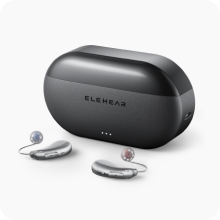
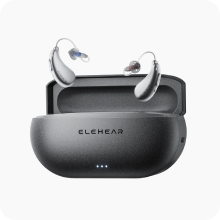
The ELEHEAR Beyond series supports Bluetooth-streamed phone calls, allowing compatible smartphones to send call audio directly to the hearing aids. The ELEHEAR App provides additional controls to adjust the listening experience when needed.
How to Build a Better Phone Call Setup
A better phone call experience depends on how your phone, hearing aids, and wireless features work together during everyday use. Focus on the features that affect your actual calls rather than the Bluetooth label alone.
- Direct call streaming. Check whether the hearing aids can receive phone audio directly. This can make calls easier to manage by sending the caller’s voice straight to the hearing aids instead of relying only on the phone speaker.
- Device compatibility. Make sure your smartphone and hearing aids support the connection features you need. Compatibility can vary depending on the phone model, operating system, and supported Bluetooth functions.
- Call microphone setup. Check how your voice is captured during calls. Some setups allow more flexibility when speaking, while others may require keeping the phone closer.
- Easy app controls. A companion hearing aid app can make everyday adjustments easier, such as changing volume or listening settings when your environment changes.
- Reliable connection. A stable connection helps reduce interruptions from repeated pairing or switching between devices.
The best setup is the one that fits your daily calling habits, whether you mainly take short phone calls, join long conversations, or use your phone for streaming and other audio.
Make Phone Calls Work Better for Your Listening Needs
Phone calls can be harder to follow because they remove visual cues and rely on a more limited audio signal. Start with simple changes such as reducing background noise, checking call settings, and improving how audio reaches your hearing aids. If calls remain difficult, Bluetooth streaming and proper hearing aid adjustments can help create a more comfortable everyday listening experience.

Common Questions About Hearing Aids and Phone Calls
Q1. Why Can I Hear Someone in Person but Not on the Phone?
Face-to-face conversations provide facial expressions, lip movements, gestures, and other visual information that help confirm speech. An audio-only phone call removes those cues and may also provide less consistent sound because of background noise or connection quality.
Q2. Do Bluetooth Hearing Aids Work With Android Phones?
Many do, but compatibility varies between hearing aids and Android devices. Check whether your specific phone supports the hearing aid's connection method and whether the features you need, such as direct call streaming, are supported.
Q3. Can All Bluetooth Hearing Aids Stream Phone Calls?
No. Some hearing aids use Bluetooth mainly to communicate with an app, while others support direct streaming for phone calls, music, and other audio. Check call-streaming support separately when comparing models.
Q4. Why Is One Person Much Harder to Hear on the Phone?
Their microphone, surroundings, phone connection, and speaking style can all affect the audio you receive. If the problem occurs mainly with one caller, ask them to move somewhere quieter or try another connection before changing your hearing aid settings.
Q5. Should I Turn Up My Hearing Aids When Phone Calls Sound Unclear?
Check the phone's call volume, audio routing, Bluetooth connection, and surroundings first. More hearing aid volume may make the whole call louder without making unclear speech easier to distinguish. If most calls remain difficult, reviewing your listening settings may be more useful.


