
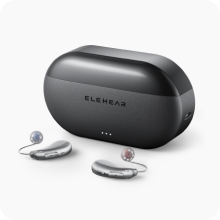
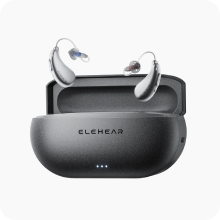


Setting up the ELEHEAR Delight takes about 10 minutes. This step-by-step guide walks you through unboxing, Bluetooth pairing with your iPhone or Android phone, downloading the ELEHEAR app, and customizing your settings for the best listening experience.
If you haven't ordered yet, you can buy hearing aids online directly from ELEHEAR with free shipping and a 45-day risk-free trial — your Delight typically arrives within a few business days.
[toc]
What You Need Before You Start
Before opening the box, make sure you have:
- Your smartphone — iPhone (iOS 14 or later) or Android (version 10 or later)
- Bluetooth enabled on your phone
- A Wi-Fi or cellular connection for downloading the ELEHEAR app
- A few minutes in a quiet room — this helps during the initial sound check
Step 1: Unbox Your ELEHEAR Delight
Inside the box you'll find:
- Left and right ELEHEAR Delight hearing aids
- Charging case with USB-C cable
- Multiple ear-wing sizes (small, medium, large)
- Multiple ear tip sizes
- Quick start guide
Tip: The Delight uses an earbud-style in-the-canal (ITC) design with ear-wings for a secure, discreet fit. Take a moment to try different ear-wing and tip sizes before pairing — a good physical fit directly affects sound quality.
Step 2: Charge Your Hearing Aids
- Place both hearing aids into the charging case.
- Connect the USB-C cable to the case and plug it into a power source.
- Let them charge for at least 30 minutes before first use (a full charge takes approximately 1.5 hours).
- The LED indicators on the case will show charging status — solid light means fully charged.
Step 3: Download the ELEHEAR App
The ELEHEAR app is where all customization, sound adjustments, and remote audiologist access happen. Download it before turning on your hearing aids.
For iPhone
- Open the App Store.
- Search for ELEHEAR.
- Tap Get and wait for the download to complete.
- Open the app and create your account (email and password).
For Android
- Open the Google Play Store.
- Search for ELEHEAR.
- Tap Install and wait for the download to complete.
- Open the app and create your account (email and password).
Note: The ELEHEAR app requires location permissions on Android for Bluetooth pairing — this is a standard Android requirement for Bluetooth Low Energy devices, not a tracking feature.
Step 4: Turn On Your ELEHEAR Delight
- Remove both hearing aids from the charging case.
- The Delight powers on automatically when removed from the case.
- You should hear a startup tone in each ear, confirming they're active.
- If you don't hear a tone, place them back in the case for a few seconds and remove them again.
Step 5: Pair with Bluetooth
Pairing with iPhone
- Open Settings on your iPhone.
- Tap Bluetooth and make sure it's turned on.
- Your ELEHEAR Delight devices should appear in the list of available devices (listed as "ELEHEAR Delight L" and "ELEHEAR Delight R" or similar).
- Tap the device name to connect.
- Accept the pairing request when prompted.
- Both left and right units will connect — some iPhones pair both automatically after connecting the first one.
Alternative method (recommended):
- Open the ELEHEAR app.
- Tap Connect Device on the home screen.
- The app will scan for nearby ELEHEAR devices.
- Tap your Delight when it appears.
- Follow the on-screen prompts to complete pairing.
Pairing with Android
- Open Settings on your Android phone.
- Tap Connected Devices (or Bluetooth, depending on your phone model).
- Tap Pair New Device.
- Your ELEHEAR Delight will appear in the available devices list.
- Tap to connect and accept the pairing prompt.
Alternative method (recommended):
- Open the ELEHEAR app.
- Tap Connect Device.
- Grant Bluetooth and location permissions if prompted.
- The app will detect your Delight hearing aids automatically.
- Tap to pair and follow the on-screen instructions.
Using the app method is recommended because it pairs your hearing aids and links them to your ELEHEAR account simultaneously, enabling features like remote audiologist support and cloud-saved settings.
Step 6: Run the Initial Hearing Profile Setup
Once paired, the ELEHEAR app will prompt you to set up your hearing profile. This is a critical step — it customizes the AI sound processing to your specific hearing needs.
- Take the in-app hearing assessment — the app plays a series of tones at different frequencies and volumes. Respond honestly to each prompt.
- Review your hearing profile — the app generates a personalized audiogram showing your hearing levels across frequencies.
- Apply recommended settings — the app automatically configures amplification, noise reduction, and VOCCLEAR AI processing based on your results.
This entire process takes about 3 to 5 minutes and can be repeated anytime if your hearing changes or you want to refine your settings.
Step 7: Customize Your Sound Settings
After the initial setup, explore these key settings in the app:
Volume and Balance
- Adjust overall volume for left and right ears independently
- Set a comfortable baseline — you can always adjust later
Sound Environments
The ELEHEAR app includes preset sound profiles for common situations:
- Quiet — for home, reading, or one-on-one conversation
- Outdoor — reduces wind noise and enhances voices
- Restaurant — prioritizes the speaker in front of you, reduces background chatter
- Music — widens the frequency range for richer audio
AI Noise Reduction
- Toggle AI-powered noise reduction on or off
- Adjust the intensity from light to aggressive depending on your environment
Bluetooth Audio Streaming
- Stream phone calls, music, podcasts, and video audio directly to your Delight hearing aids
- Adjust streaming volume independently from hearing aid amplification
Step 8: Fit the Ear-Wings for a Secure Hold
The Delight's earbud-style design uses ear-wings to stay securely in place during movement. Getting the right fit matters:
- Start with the medium ear-wings (pre-installed).
- Insert the hearing aid into your ear canal and tuck the ear-wing into the curved ridge of your outer ear.
- Shake your head gently and move your jaw. The aid should stay firmly in place.
- If it feels loose, switch to the larger ear-wings. If it feels too tight or causes discomfort, try the smaller size.
- Repeat for the other ear — your left and right ears may need different sizes.
Step 9: Connect to ElePro Remote Audiologist Support (Optional)
ELEHEAR offers ElePro, a remote audiologist service accessible directly through the app. To activate it:
- Open the ELEHEAR app.
- Navigate to the ElePro or Professional Support section.
- Schedule a virtual consultation or send a message to an audiologist.
- The audiologist can review your hearing profile and remotely adjust your Delight settings.
This is especially useful during the first few weeks as you adapt to wearing hearing aids.
Troubleshooting Common Bluetooth Issues
Hearing aids not appearing in Bluetooth list
- Make sure the Delight is out of the charging case and powered on.
- Bring your phone within 3 feet of the hearing aids.
- Toggle Bluetooth off and on again on your phone.
- Restart the ELEHEAR app.
Audio cutting in and out
- Check that your phone's Bluetooth is not connected to another audio device simultaneously.
- Move closer to your phone — Bluetooth range is typically 30 feet, but walls and obstacles reduce it.
- Update the ELEHEAR app and hearing aid firmware to the latest version.
Only one ear connecting
- Place both hearing aids back in the charging case for 10 seconds, then remove them.
- In your phone's Bluetooth settings, forget the ELEHEAR devices and re-pair from scratch.
- Use the ELEHEAR app's pairing process rather than manual Bluetooth pairing.
App not detecting hearing aids (Android)
- Confirm that location permissions are granted for the ELEHEAR app (required for Bluetooth on Android).
- Check that your Android version is 10 or later.
- Restart your phone and try again.
Quick Reference: ELEHEAR Delight Specifications
| Feature | Detail |
|---|---|
| Style | Earbud-style ITC (in-the-canal) |
| AI Technology | VOCCLEAR AI |
| Bluetooth | Yes — audio streaming + app control |
| Fit System | Ear-wings for secure hold |
| App | ELEHEAR app (iOS 14+ / Android 10+) |
| Remote Support | ElePro audiologist care |
| Trial | 45-day risk-free |
| Warranty | 1 year |
| HSA/FSA | Eligible |
| FDA | Registered |
Looking at Other ELEHEAR Options?
The Delight is purpose-built for users who prioritize a discreet earbud-style design. If your needs are slightly different, ELEHEAR has two other models worth knowing about:
- For maximum speech clarity in challenging environments, check out Elehear Beyond Pro reviews — the flagship BTE model with VOCCLEAR 2.0 and 20-hour battery.
- For built-in tinnitus relief alongside AI hearing enhancement, the ELEHEAR Beyond offers full AI noise reduction with sound therapy programs in one device.
Final Tips for New Users
- Wear your Delight for 2 to 4 hours on the first day and gradually increase wear time over the first week. Your brain needs time to readjust to amplified sound.
- Start in quiet environments before moving to noisy settings like restaurants or busy streets.
- Check for app updates regularly — ELEHEAR pushes firmware and AI model updates that improve performance over time.
- Use the 45-day trial period fully — give yourself at least 2 to 3 weeks of consistent daily use before evaluating whether the Delight is right for you.
- Reach out to ElePro if anything feels off — remote audiologist adjustments can make a significant difference without requiring an in-person visit.
All ELEHEAR hearing aids are FDA registered, HSA/FSA eligible, and include free shipping, a 45-day risk-free trial, and a 1-year warranty.


